Daily bell times
| Session | Time |
|---|---|
| Before school duty | 8:10am – 8:30am |
| Fratelli | 8:30am – 8:40am |
| Lesson 1 | 8:40am – 9:40am |
| Lesson 2 | 9:40am – 10:40am |
| First Break | 10:40am – 11:10am |
| Lesson 3 | 11:10am – 12:08pm |
| Sophia Stillness | 12:08pm – 12:12pm |
| Lesson 4 | 12:12pm – 1:10pm |
| Second Break | 1:10pm – 1:40pm |
| Lesson 5 | 1:40pm – 2:40pm |
| After school duty | 2:40pm – 3:10pm |
Sophia Stillness happens every day during Lesson 3 — at 12:08 a chime rings calling the whole College to be still, and from 12:08–12:12 guided meditation or music plays. The first minute is for packing up and settling before Stillness begins.
Term dates & key events
Recurring annual events (confirm exact 2026 dates on the College Calendar):
| Event | 2026 date |
|---|---|
| Meet the Teacher evening | 23 February |
| Open Evening | 29 April |
| Mothers' Day breakfast | 8 May |
| Fathers' Day breakfast | 28 August |
| Twilight Market | 5 September |
| Awards Evening | 14 October |
| Valedictory | 18 November |
The full College Calendar (including camps, retreats, exam blocks and PD days) is on the College Portal — add the link here. To add to the calendar, contact a CLT member.
Meetings & briefings
| Meeting | When |
|---|---|
| Whole-staff Briefing | Wednesday mornings, 8:00am |
| Staff / CoP Meetings | Alternating Monday afternoons |
| Faculty Meetings | Monday afternoons (3-week rotation) — Group A: RE/Technologies/HPE · Group B: Maths/English · Group C: Humanities/Science/Arts |
| House Companion meetings | Friday mornings, before school |
| Pedagogy Companion meetings | Tuesday afternoons, after school |
Every Sunday afternoon (term time), a Staff Communicare Teams message goes out covering the week ahead — read it by close of business Tuesday and give it a thumbs-up to confirm you've seen it. The Sophia Vine newsletter publishes every 3 weeks as a SWAY.
Student roll marking (eMinerva)
Student attendance is recorded in eMinerva (BCE's student information system) — not Engage or STARS. Rolls must never be marked retrospectively (after students have left the session).
- Fratelli teachers mark the roll within the first 5 minutes of Fratelli
- Subject teachers mark the roll within the first 15 minutes of every lesson, all day
- Mark students accurately: "Present – In Class", "Present – In Sick Bay", "Absent – Explained", "Absent – Unexplained", etc. — don't change these categories unless the student is actually in class
- Marking a roll after students have left the session ("retrospective marking") is against BCE's Code of Conduct — a phone call will be made if a roll isn't marked on time
- If a student was marked present but isn't in class without permission, ring Student Services immediately — don't wait
- A Mobile Attendance Application is available via the school portal (using your BCE username/password) if you prefer marking on the go — your buddy will show you what the symbols mean and when phone marking is used
Staff leave, pay and long service leave balances are managed through Ignite; the broader staff portal (including "About Me") is Spire — see Digital Tools.
If you're away
Text the Deputy Principal before 6:00am explaining the duration/reason (include your name) — 0403 322 146 — and set work for your classes via email by 8:00am at the latest. Non-teaching staff notify the Business Manager, Denise McGeary, directly.
Sending a student to sick bay
Sick bay is in the Reception building (a separate building in front of La Verna/Administration — see Campus Maps).
Call ahead
Phone Student Reception before sending the student, so they know who's coming.
Give the student an out-of-class token
The student presents it on arrival at Student Reception, where staff will mark them present in sick bay.
Collect your token
Pick it back up from Student Reception during your break or at the end of the day.
If a student is too unwell to stay at school, Student Reception will contact home to arrange collection.
Playground & duty of care
Sophia College runs a strict roster for supervising students during breaks, and before/after school. When on duty:
- Carry a mobile phone for emergency use only
- Wear a high-visibility vest and broad-brimmed hat
- Actively supervise — move around the whole area. Correcting work, reading, prepping or eating is not appropriate while on duty
- Be on time. If you're unavailable at short notice, arrange another teacher to cover you; the Deputy Principal arranges cover for known/sick leave
- Stay in your duty area until relieved — if your replacement hasn't arrived, phone Student Reception or send a student to the office
Duty area map
Official duty-area map with each zone colour-coded to its code below:
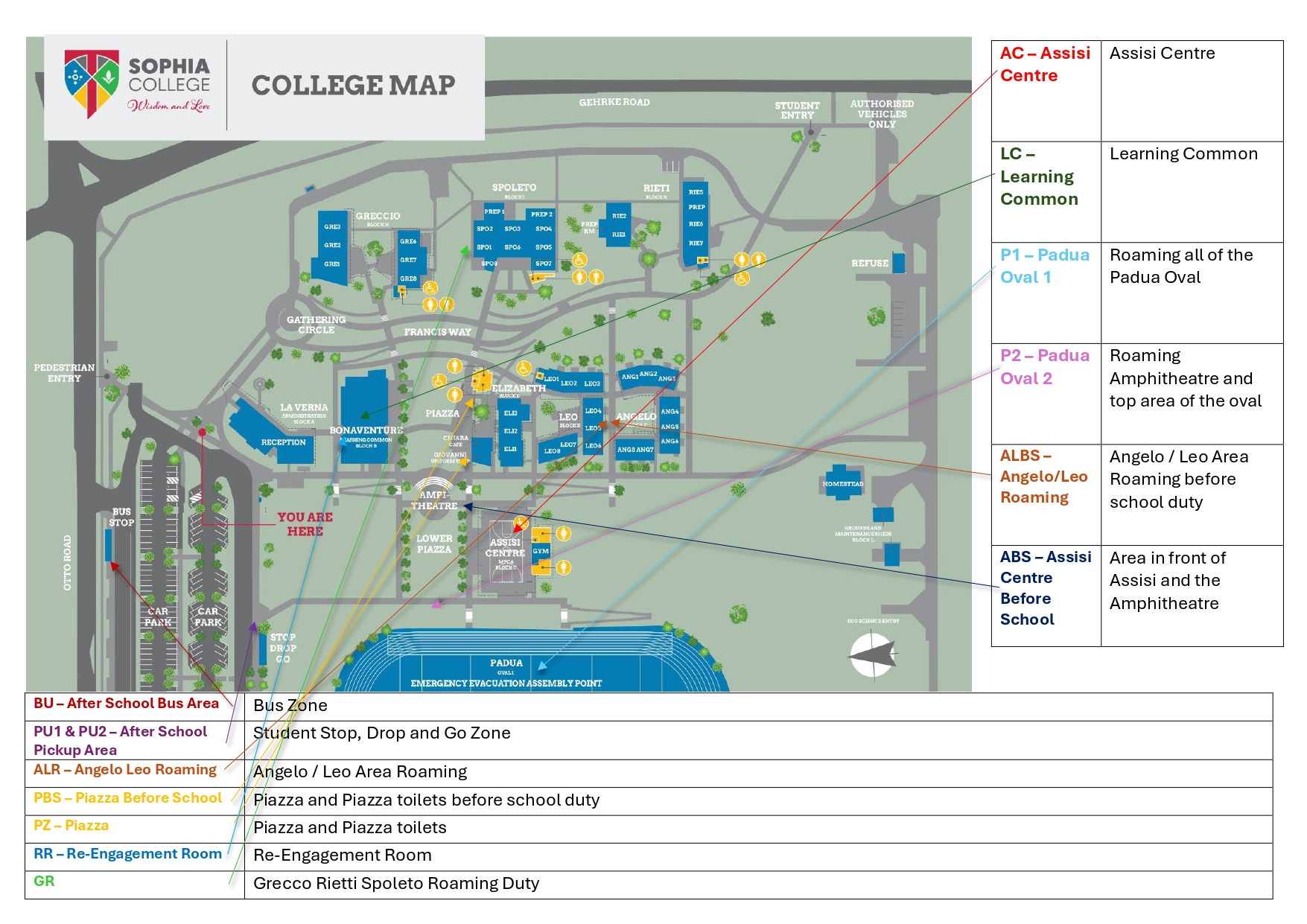
Duty areas & times
| Code | Area | When | Key requirements |
|---|---|---|---|
| ABS | Assisi before school (front of Assisi & Amphitheatre) | 8:10–8:30am | Uniform check; collect phones if in use; no locker access before first bell; no contact/large ball games |
| PBS | Piazza before school (Piazza & toilets) | 8:10–8:30am | Uniform check; collect phones; no locker access before first bell |
| ALBS | Angelo/Leo before school (from La Verna/Padua path, roaming) | 8:10–8:30am | Uniform check; collect phones; scooters/bikes walked in; no locker access before first bell |
| PZ | Piazza (incl. Elizabeth lockers) | First & Second Break | No contact games; students clean area; collect lunch bags; monitor Elizabeth lockers |
| AC | Assisi Centre | First & Second Break | Formal hats required (else send to Piazza); no food/drink inside; students clean area |
| P1 | Padua Oval 1 (roaming) | First & Second Break | Formal hats required; no contact games; equipment returned to Assisi Centre |
| P2 | Padua Oval 2 (stairs above assembly area, Amphitheatre) | First & Second Break | Formal hats required; no contact games |
| LC | Learning Common (Angelo 4–6) | First & Second Break | Devices for learning use only; no food; closes 11:00am / 1:30pm |
| ALR | Angelo/Leo roaming (undercover area & lockers) | First & Second Break | No contact games; monitor lockers/behind buildings; students clean area; collect lunch bags |
| GR | Greccio/Rieti/Spoleto roaming | First & Second Break | Usher students from lockers; uniform check; collect phones; direct non-compliant students to the Re-Engagement Room or reception |
| PU1 / PU2 | After-school pickup (drop-off/pickup zone + Assisi Centre sweep) | 2:40–3:10pm | Hats required; blazers Terms 2 & 3; phones ok, no other devices; students don't return to grounds; bikes/scooters walked out |
| BU | After-school bus area | 2:40–3:30pm | Same requirements as pickup |
| RR | Re-Engagement Room | — | See Behaviour & Pastoral Support |
Out of bounds
- Greccio & Rieti (unless in an extra-curricular activity)
- Locker areas (except the last 5 minutes of a break)
- Leo & Angelo (only accessible for the Re-Engagement Room or Learning Common)
- The area between Greccio & Rieti
- Construction zones
The current term's specific staff roster (who's on which duty, when) is separate from this — add where staff find their personal assignment.
Excursions
- Approval needed from your Line Manager and the Deputy Principal — plan the year prior and add to the calendar where possible
- Risk assessment and budget paperwork due 3 weeks before the excursion, to the Deputy Principal and Business Manager
- Parent slips must cover venue, departure/return times, transport, persons responsible, cost and materials required
- Need the school bus? Book through Karen McGarrigal (karen.mcgarrigal@bne.catholic.edu.au) with as much detail as possible — don't submit a booking without talking to Karen first
- Arrange with College Reception for an eMinerva activity to be created at least 2 days before, so a roll can be generated — use the mobile attendance app or a paper roll on the day
- Complete the debrief and return the original risk assessment within 24 hours of the activity
Parent-Teacher Interviews
Parent-Teacher Interviews are managed through Booked. Make sure your availability is set before bookings open each term.
📅 Open Booked ↗Uniform & dress code
You're also responsible for monitoring student uniform compliance — remind the student, then log it in STARS. See STARS for how uniform infringements escalate. Exemptions and loan uniforms are handled by House Companions — they'll send a student to Student Reception to organise a loan (entered on the uniform register and signed back in on return).
Lockers
- Every student gets a locker and a College padlock
- No decoration or graffiti; no food or devices left in lockers over weekends/holidays
- Lockers are cleaned out and padlocks returned at the end of each year
- The College doesn't take responsibility for property missing from a locker
- Lost locks are replaced through QKR and kept at Student Reception — lock/lock-out issues are handled by House Companions
Facilities & maintenance
Spotted a maintenance or safety issue on campus (broken furniture, a leak, faulty equipment)? Log it directly so Facilities can action it.
🛠️ Submit a Maintenance Request ↗Emergency procedures & WHS
Full evacuation/lockdown procedures are in the Sophia College Emergency Evacuation handbook on the staff portal (WH&S folder) — the Emergency Evacuation Assembly Point is Padua Oval 1 (see Campus Maps).
- Report any injury (yours or a student's) as soon as possible via the online form on the portal (WH&S folder) — the College WHSO completes BCE reporting from there
- For help with the incident form or a WorkCover claim, contact the Business Manager, Denise McGeary
- A Sun Safe policy applies across the College
- WHS is everyone's responsibility — policies and procedures are on the portal under the WH&S folder